Apple's iOS 26 Liquid Glass and Android's Material 3 are the biggest shifts in mobile design language in years. Most business apps will spend a long time catching up. The Dstny Mobile App already speaks both.
Dstny Mobile 7.0.0 is the first phase of our Mobile revamp and it’s now rolling out across app stores.
Business apps usually lag the platform. We decided not to.
There's a familiar pattern in enterprise software: Apple and Google move their design language forward, consumer apps follow within months, and business apps stay frozen somewhere two or three generations back. Users notice this every time they switch to their work app. It feels like stepping into the past, which consciously or not erodes adoption over time.
With Mobile 7.0.0, the Dstny app adopts iOS 26 Liquid Glass and Android Material 3 as its design foundation, replacing custom-built interface components with the native frameworks of each platform. iOS 18 remains fully supported with a classic bottom navigation bar but with this update the app looks and feels like it belongs on the phone it runs on, because it's built from the same components.
Just as important is what this means going forward. By building on the platforms' own components, future iOS and Android updates can be adopted faster, with less engineering effort spent keeping up and more spent moving forward.
-3.png?width=332&height=400&name=Untitled%20design%20(6)-3.png)
An upgrade, not a migration
We could have launched this as a brand new app, but we made the deliberate choice not to. A new app means a new installation for every user and a new rollout for every customer which is exactly the kind of disruption that undoes the goodwill a redesign is supposed to create.
Instead, we made deep improvements to the existing app so 7.0.0 arrives the way users expect: as a regular update. Existing users keep their existing settings, and a short ‘What's New’ walkthrough on first launch shows them exactly what has changed. For customers and partners, the transition is seamless, with nothing to reinstall, nothing to reconfigure and nothing to migrate.
-1.png?width=989&height=400&name=Untitled%20design%20(4)-1.png)
Navigation that works the way people do
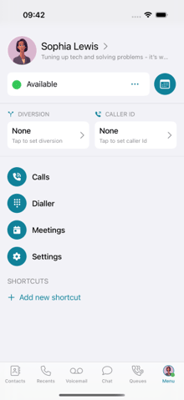
Inside the update, the slide-in menus are gone. In their place is a fixed bottom navigation bar holding the things users reach for every day: Contacts, Recents, Voicemail, Chat, and Queues. Everything else including shortcuts, diversion, caller ID and activity now lives in a single menu behind the user's avatar, where activity status is also visible at a glance.
The layout is the same for every user, ensuring maximum consistency. This means one set of training materials, one support conversation, and a predictable experience whether you're onboarding five users or five thousand.
Ready from the very first launch
The empty contacts screen is gone too. From the first open, the app pre-populates every contact from the company directory, with a simple toggle between All and Favourites. There is nothing to configure and nothing to sync.
Calls got smarter as well. During an active call, a transfer button now appears next to each contact in the list, attended or blind depending on the user's settings. A handoff that used to mean navigating away from the call screen now only takes two taps.
-1.png?width=193&height=400&name=Untitled%20design%20(7)-1.png)
The beginning of our mobile revamp
We're calling Mobile 7.0.0 Phase 1 of our mobile revamp for a reason. Modernising the design foundation, the navigation, and the first-launch experience is the groundwork that everything else stands on.
For our existing partners, this refresh is a natural reason to revisit customers with low mobile adoption. The usability barriers they may have run into before are exactly what this release addresses.
Mobile 7.0.0 is available now for fully-managed UCaaS, Hybrid, and Core Standalone environments, and is now generally available in most app stores.
The phone in your pocket moved forward this year. Your Dstny business app just moved with it. If you're an existing Dstny partner, get in touch with your representative for more information. If you're new to Dstny and are looking to build our brand new mobile UI into your services, make sure you get in touch.