
Joshua Moynehan
|Blog
|2024-07-15|6 min
Long gone are the days of Teams being bundled in with standard Microsoft license packages, so its now more important than ever to know exactly what you need as a business to get calling in Teams. It's true, there is now yet another layer of licensing needed to use Teams to call external numbers via a PSTN breakout, but the level of additional licenses that you'll need still depends on your requirements and is often at the centre of the first questions asked when businesses start to look at Teams voice. In this article we will be giving an in-depth look at what Microsoft licensing is out there, what it covers and what you may need to get using Teams Phone to make calls.
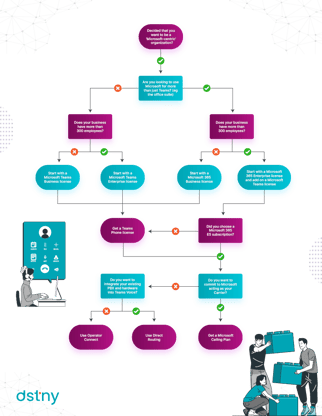
So first things first, depending on the size of your business if you're looking to use more than just Teams you will need either a Microsoft 365 Business license or a Microsoft 365 Enterprise license. If wanting to use Microsoft Teams by itself a business can alternatively just start with a Microsoft Teams business license or a Microsoft Teams enterprise license. All of these licenses have per user, per month pricing structures and each of them are split into tiered bundles which have different capabilities. But what exactly are the differences between all of them?
Microsoft 365 Business licenses are for companies with fewer than 300 employees. There are three main price tiers for Microsoft 365:
Each tier provides different features and service levels. For example the Microsoft 365 Business Basic license comes with web versions of the Microsoft suite, but the Microsoft 365 Business standard license and above come with access to the desktop versions.
Microsoft 365 Enterprise licenses are for larger companies with more than 300 employees. They deliver more features and services than 365 Business licenses and come in at a higher price point. Microsoft 365 Enterprise licenses are separated into two main categories:
For businesses looking to empower their frontline workers there are also Microsoft 365 F3 licenses.

In April 2024, Microsoft made the choice to stop bundling Teams with standard Microsoft licensing suites, because of this if you want to have access to Microsoft Teams you will have to buy a separate Microsoft Teams license (again there is one set of licenses for Business and one for Enterprise). Like the Microsoft 365 licenses, these are also split into tiers and have different per month/per user pricing structures to suit different needs. A Microsoft Teams license is the first thing that you will need to get calling in Teams.
With a Microsoft Teams license, companies can make calls internally, collaborate with video calls, send messages, and share files. This means that the great unbundling of Microsoft Teams presented a new opportunity for businesses who wanted to unlock Teams for collaboration (and communication, but we'll talk about this a bit later) without paying for the more costly Microsoft 365 bundle.
To be used for PSTN calling however, businesses will also need another key proponent to make calls externally outside of Teams - A Microsoft Teams Phone license. With it, you can unlock the cloud-based phone system that lies within the Teams interface which lets users receive and transfer calls. If you're an enterprise, the Microsoft 365 E5 subscription already comes with a Teams Phone license, but if you're on an E3 license you will need to buy your Teams Phone license separately.
So that's the Microsoft licensing stack you will need, but you will still have to decide which calling method you want to use.

There are three main ways in which you can make PSTN calls using Microsoft Teams - Microsoft calling plans, Operator Connect and Direct Routing.
Microsoft Calling plans essentially allow Microsoft to act as your carrier by providing numbers and minutes. For this Microsoft offer domestic, international and pay as you go options. There are however a few limitations to calling plans including limited flexibility, scalability and in a lot of instances a higher cost is attached when compared to other options. It is for this reason that there is a growing portion of all PSTN enabled Teams users who are using third party providers to bring voice into Microsoft Teams.
There is some speculation that Operator Connect is expected to become the most widely used Teams Voice solution in the next few years. With Operator Connect, businesses can access the Teams Operator Connect marketplace in the Teams admin centre and simply select their chosen Carrier. With over 100 carriers now on the Operator Connect platform, businesses have the ability to choose carriers that they trust to bring voice into Teams. Even though the Operator Connect platform gives users the ability to choose from a long list of pre-approved carriers, it does not allow for number porting so in some instances there is a clash with existing infrastructure.
And finally onto the current leading method in Teams voice enablement - Direct Routing. Direct Routing allows companies to add existing business phone technology to their Teams environment with their existing phone provider (or another if they should so choose), avoiding both costly 'rip and replace' actions.
There is no need to purchase a Microsoft calling plan when utilizing the Direct Routing feature as your minutes and numbers are provided by an external Service Provider but you will still need to get that Microsoft Teams Phone license that we talked about earlier (if you're not already on an E5 license and have it bundled in).
As a leading example, Call2Teams is world renowned for helping providers integrate Direct Routing routing solutions, and as an agnostic middleware it has helped over a million users get calling in Teams across the globe.
And so, getting to a point where as a business you are able to make calls in Teams requires a number of components:
For a guided walkthrough of the Microsoft licensing journey, visit our interactive Microsoft licensing infographic below.